How to Write AI Cold Emails from Website Audit Findings
AI drafts a usable cold email only when given a true, specific fact. Use website audit findings, a prompt that blocks invention, and a review checklist.
Ask an AI model to "write a cold email to a dentist" and you get a polite paragraph that could go to any dentist on earth. Ask it to personalise without giving it anything real and it may make something up: a recent award, a busy waiting room, a compliment on a website it never saw. The fix is not a cleverer prompt. It is a true, specific fact that the model can build on, and a website audit produces exactly that kind of fact for every business on a list.
Why does AI need a real fact to write a usable cold email?
Because without one, the model either writes something generic or fills the gap with something false. Anthropic's guide to reducing hallucinations says language models "can sometimes generate text that is factually incorrect or inconsistent with the given context". In a cold email that is worse than bland: an owner who reads a claim about their business that is not true stops reading and remembers your name for the wrong reason.
The same guide lists the countermeasures that matter here: give the model explicit permission to say it does not know, tell it to "only use information from provided documents and not its general knowledge", and check each claim against a source afterwards. It also notes that these techniques reduce hallucinations but "don't eliminate them entirely". So the workflow has two halves: feed the model one verified fact, and have a person check the result.
Which audit findings make good openers?
Good openers are findings the owner can confirm on their own phone and that plausibly cost them customers. Poor openers are abstract, unverifiable or insulting. If you need findings to work with, run a single site through the free website audit tool and look at what it reports.
| Finding | Good opener? | Why |
|---|---|---|
| Homepage took 8.4 seconds to load in a mobile test | Yes | Measured, specific, and the owner can try it on their own phone. |
| Site loads without HTTPS | Yes | Visible in the address bar, easy to confirm, and a clear fix. |
| Homepage has no title or meta description | Yes, for SEO offers | Google's Search Central asks for a <title> on every page and unique descriptions per page. |
| No contact form or booking link on the site | Yes | Ties directly to enquiries the owner might be missing. |
| Website score 38 out of 100 | No | A bare number the owner cannot verify or connect to customers. |
| "Your site looks outdated" | No | An opinion, not a finding, and the owner may have paid for that design. |
| Accessibility contrast issues on 14 elements | Rarely | True but hard to explain in one line. Better inside a report. |
On the SEO findings, stay inside what Google says. Its title link documentation says "Make sure every page on your site has a title specified in the <title> element", and its snippet documentation says Google only "sometimes uses the meta description". So a missing description is a fair point about how the business presents itself in results, not a promise of more traffic. Do not let the model turn it into one.
Use one finding per email. Three problems in a first message reads like a lecture, and each extra claim is one more thing to check. Pick the finding that matches what you sell: a load time for a speed offer, a missing title for an SEO offer, a missing form for a redesign. Keep the rest for the report.
How do you write a prompt that stops the AI inventing details?
Give it only the facts it may use, in labelled fields, and an explicit rule about everything else. This structure works with any capable model:
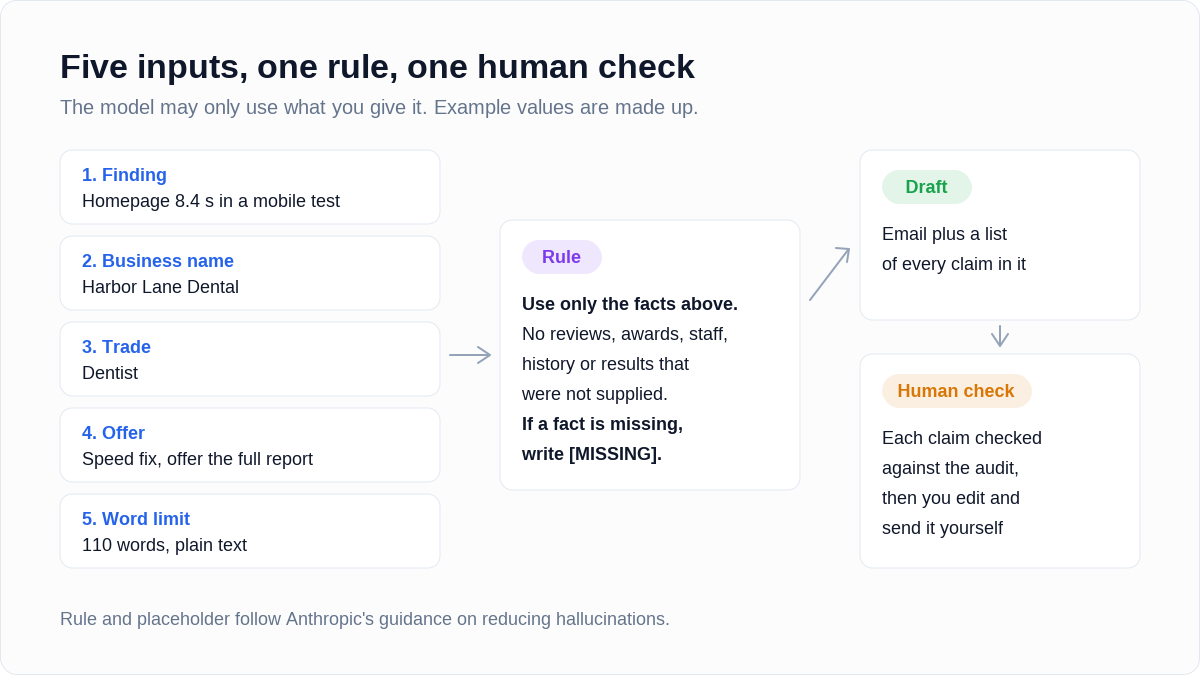
- 1Finding: one audit result, written as a fact with its measurement.
Homepage took 8.4 s to load in a mobile test on 2026-11-20. - 2Business name: exactly as it appears on the listing.
- 3Trade: the category, so the model can say why the finding matters to that kind of business.
Emergency plumber. - 4Offer: what you sell, in one sentence, and the next step you want.
Speed fix for small business sites; offer to send the full report. - 5Word limit: a hard number, such as 110 words, plus the format: plain text, no subject line puffery, one question at the end.
- 6Rule:
Use only the facts above. Do not mention reviews, awards, staff, history, competitors or results you were not given. If a fact you need is missing, write [MISSING] instead of guessing.
The [MISSING] placeholder follows Anthropic's advice to let the model admit uncertainty, and it makes gaps easy to spot in review. Ask for the draft and, separately, a list of every factual claim it contains. That second list is what you check.
What do before-and-after AI cold emails look like?
The "before" drafts illustrate what a prompt with only a business name and trade can produce. The "after" drafts follow the structure above. The businesses, domains and findings are all made up.
Example 1: Harbor Lane Dental (made-up business)
Before: "Hi, I came across Harbor Lane Dental and was impressed by your commitment to patient care and your glowing reviews. Many practices like yours are leaving money on the table with their online presence..." Two invented claims in one sentence, and a vague pitch.
After: "Hi, I tested harborlanedental.example on a phone this week and the homepage took 8.4 seconds to load. For a patient looking for a dentist on their phone, that is a long wait before they see your number. I fix slow small-practice sites. Would it help if I sent the full test results?"
Example 2: Ridgeway Plumbing (made-up business)
Before: "As a leading plumber in your area, you know how competitive the market is..." The model does not know whether they lead anything.
After: "Hi, ridgewayplumbing.example has no contact form or booking link, so the phone number is the only way in. Someone with a leak at 11pm may not want to call. I add simple enquiry forms to trade websites. Want me to show you what that would look like on your homepage?"
Example 3: Maple Street Bakery (made-up business)
Before: "Your website scored 41/100 in our audit, which means you are losing customers every day." A bare score and an unsupported conclusion.
After: "Hi, maplestreetbakery.example loads without HTTPS, and the homepage has no page title, so search results have to guess what to show for it. Both are quick fixes. I can send a one-page summary of what I found, if useful."
For full sequences built around one finding, see our cold email templates for local businesses. If the email offers a report, a white-label audit report under your own brand is the natural thing to attach to the reply.
What should you check before sending an AI-written email?
Every factual claim, against the audit and the listing. A two-minute check per email is the price of using AI safely:
- Every claim traces to a field you supplied. Anything about reviews, awards, staff or years in business that you did not provide comes out.
- The finding is still true. Open the site. Owners fix things, and audits age.
- The business name and domain are exact, with no autocorrected spelling.
- No [MISSING] placeholder is left in the text.
- No promise of outcomes, such as rankings, traffic or more customers, that you cannot back up.
- The subject line matches the body. The FTC lists deceptive subject lines as a CAN-SPAM violation.
- Your postal address and an opt-out line are in the footer, and the email goes to an address the business publishes. Our guide to building a cold email list from Google Maps covers sourcing and verifying those addresses.
Every CazaLead plan drafts an outreach email for each lead from its own audit findings, and on paid plans the draft is AI-written. CazaLead never sends email: you review the draft, edit it and send it from your own mailbox, which keeps the checklist above in your hands.
What do CAN-SPAM and Google's sender guidelines require?
CAN-SPAM sets content rules for commercial email in the US, and Google sets technical rules for mail reaching Gmail. The FTC's CAN-SPAM compliance guide says "The law makes no exception for business-to-business email" and lists seven requirements: no false or misleading header information, no deceptive subject lines, identify the message as an ad, include a valid physical postal address, tell recipients how to opt out, honour opt-outs within 10 business days, and monitor what others do on your behalf. The guide states penalties of up to $53,088 for each separate email in violation. This is not legal advice.
Google's email sender guidelines require all senders to set up SPF or DKIM, have valid forward and reverse DNS, use TLS and keep spam rates reported in Postmaster Tools below 0.3%. Bulk senders, those sending 5,000 or more messages a day, must also set up SPF, DKIM and DMARC with an aligned From domain, and support one-click unsubscribe for marketing messages. Google recommends staying below a 0.10% spam rate. Our post on SPF, DKIM and DMARC walks through the DNS side.
None of this changes with AI. A specific, accurate email sent in small volumes from a properly authenticated domain is what both sets of rules point towards, and an audit finding is what makes a small, specific email possible.
Ready to find your first leads?
Start with 50 free leads every month. No credit card needed.
Frequently Asked Questions
Sources
- Anthropic: Reduce hallucinations
- Federal Trade Commission: CAN-SPAM Act: A Compliance Guide for Business
- Google Workspace Admin Help: Email sender guidelines
- Google Search Central: Influencing your title links in search results
- Google Search Central: Control your snippets in search results