Google Business Profile Audit Checklist for Agencies (2026)
Audit a prospect's Google Business Profile against Google's help pages: name, address, categories, hours, attributes, photos, links, reviews, verification.
A Google Business Profile is often the first thing a customer sees of a local business, before the website. For an agency, it is also free evidence: you can check a prospect's profile against Google's own rules without logging in to anything. This checklist uses only Google Business Profile help pages read in November 2026, so every point can be shown to an owner with a link to Google's wording.
What should a Google Business Profile audit check?
Ten items, each with something you can look at from outside, a clear sign of a problem and a fix only the owner can make. The table summarises them; the sections below give Google's wording.
| Item | What to look at | What a problem looks like | Owner can fix? |
|---|---|---|---|
| Name | The name on the profile against the storefront and website | Taglines, cities, services or capitals added to the real name | Yes, through Edit profile |
| Address or service area | Whether an address shows, and whether it is a real location | A P.O. box, or a street address shown by a business that only visits customers | Yes |
| Categories | The category label on the profile | Too broad, or a keyword dressed up as a category | Yes |
| Hours | Regular hours against the website | Missing hours, or hours that differ from the website | Yes |
| Special hours | Upcoming holidays | Regular hours shown on a day the business is closed | Yes |
| Attributes | Listed features such as parking or Wi-Fi | None set, or ones that contradict the website | Partly; some come from customers |
| Photos | Logo, cover and recent business photos | No logo, or only customer photos | Yes, after verification |
| Website and booking links | Where each link goes | No website, a redirect, or a booking link to a provider the business no longer uses | Yes; third-party providers can be hidden |
| Review replies | Owner replies under recent reviews | No replies, especially to critical reviews | Yes, once verified |
| Verification | A Claim this business link | The link is showing, which suggests nobody has claimed the profile | Yes, by verifying |
Do the name, address and service areas follow Google's guidelines?
Check them against Google's guidelines for representing your business. On the name, Google says "Your name should reflect your business's real-world name" and that "Including unnecessary information in your business name isn't permitted". Its list of things a name must not include covers marketing taglines, store codes, fully capitalized words, phone numbers or URLs, and service or location details. A profile called "Smith Plumbing | 24/7 Emergency Plumber Austin" is a finding; the guidelines say unnecessary information in a name "could result in the suspension of your Business Profile".
On the address, the guidelines say "Use a precise, accurate address and/or service area", and that "P.O. boxes or mailboxes located at remote locations aren't acceptable". A service-area business, such as a plumber who visits customers, "should hide your business address from customers". Google's service area page allows up to 20 service areas and says the overall area "shouldn't be more than about 2 hours of driving time from where your business is based". The owner fixes all of these in Edit profile, then Location.
Are the categories, hours and special hours right?
Look for one specific primary category and hours that match the website. Google's Edit your Business Profile page says the first category selected becomes the primary category and that up to 9 more can be added, and warns against using categories as keywords. The representation guidelines add: "Choose the fewest number of categories it takes to describe your overall core business" and "Choose categories that are as specific as possible". From outside you usually see only the category label on the profile, so note whether it describes the core business as specifically as the website does, and ask the owner about the rest.
For hours, the guidelines ask for "regular customer-facing hours of operation". Google's special hours page covers temporary changes and closures of up to 6 days in a row, set under Edit profile, Hours, Special hours. It recommends confirming hours for official holidays "even if they're the same as your regular hours", says special hours only show when the business is set to "Open with main hours", and says closures of 7 days or more should use temporarily closed instead. Before a public holiday, check whether the profile shows the right hours for that day.
Are attributes, photos and links filled in?
Check that each is present and agrees with the website. Google's attributes page describes attributes as details such as outdoor seating and Wi-Fi, and says some "may be populated based on inputs from customers who visit your business" and that some can only be changed in certain countries or categories. So a wrong attribute is not always the owner's doing, but the owner can set the ones they control under Edit profile, More.
For photos, Google's photos page describes a logo, a cover photo and business photos, asks for JPG or PNG files between 10 KB and 5 MB at a recommended 720 by 720 pixels, and notes that customers can add photos too. It also says owner photos "show up on Google only after you verify your Business Profile". A profile with only customer photos and no logo is a gap the owner can close.
For links, the guidelines ask for "a website that represents your individual business location" and say not to provide URLs that "redirect or 'refer' users to landing pages". Click the website link and note where it lands. Google's local business links page covers booking, ordering and menu links: up to 10 per type, with one that can be set as preferred. Third-party providers can add links automatically; the owner can hide a provider but cannot delete it from the profile, and providers must process opt-out requests within 5 business days. A booking button pointing at an old provider is a finding worth raising.
Is the profile verified, and does the owner reply to reviews?
Look for a Claim this business link and for owner replies under reviews. Google's claim page describes that link on unclaimed profiles. Its verification page says that to edit business information such as name or hours, and to interact with customers, "you need to verify your business". Methods include video recording, phone or text, email, live video call and postcard; Google decides which ones a business can use, and reviews usually take up to 5 business days.
Google's reviews page says "Before you can reply to reviews, you must verify your business", that approved replies are "publicly posted under the customer's review", and that "Helpful and positive replies to reviews can show that you're responsive to your customers". Scroll the most recent reviews and note how many have a reply, and whether critical ones were answered.
What does Google say about local ranking?
Only this, on its local ranking tips page: "Local results are mainly based on relevance, distance, and popularity." It then defines three factors: "Relevance is how well a Business Profile matches what someone is searching for", "Distance refers to how far each business is from the customer who's searching", and "Prominence means how well-known a business is", partly based on how many websites link to the business. It says "More reviews and positive ratings can help your business's local ranking" and "There's no way to request or pay for a better local ranking on Google."
Its tips are headed "Verify your business", "Keep your business information up-to-date", "Respond to reviews" and "Add photos and videos". Those map neatly onto this checklist, which is why it uses them. Do not promise a prospect anything beyond what that page says; for how competitors compare on the same signals, see finding competitors on Google Maps.
What can a prospector see, and what only the owner sees?
A prospector sees the live public profile; the owner also sees settings, pending edits and verification. Be clear about which side each finding comes from, so you never claim to know something you could not see.
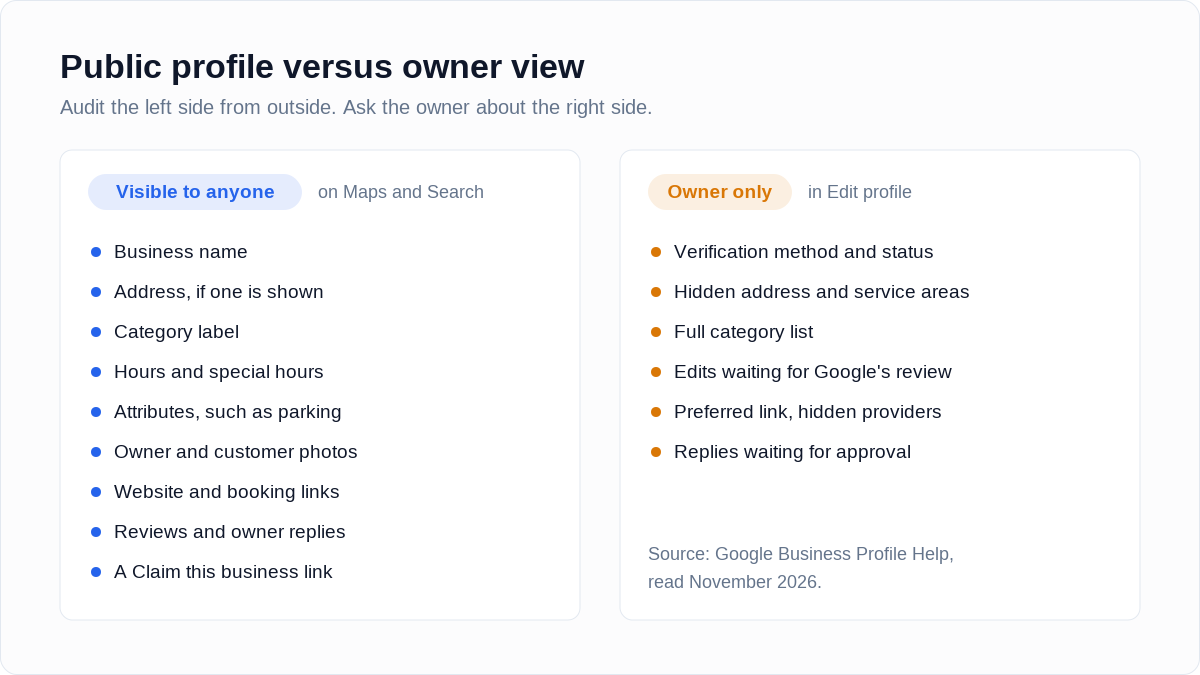
| Item | What a prospector sees | What only the owner sees |
|---|---|---|
| Verification | A Claim this business link, if unclaimed | How it was verified and which methods Google offers |
| Address and service areas | The address, if one is shown | A hidden address and the service areas set in Edit profile |
| Categories | The category label on the profile | The full primary and additional category list |
| Attributes | Attributes shown on the profile | Which ones the owner set, and which are available for the category |
| Links | The website and booking links shown | The preferred link and any hidden providers |
| Edits | Only the live profile | Edits under review; Google's attributes page says checks usually take about 10 minutes but can take up to 30 days |
| Reviews | Reviews and approved replies | Replies still waiting for Google's check |
How does the profile check pair with a website audit?
The profile sends people to the website, so check both and compare them. A profile with accurate hours and a strong review count still loses customers if the website it links to is slow, insecure or has no way to get in touch. Run the linked site through the free website audit tool, then work through this order:
- 1Open the profile on Google Maps and note name, address, category, hours, attributes, photos, links, recent reviews and replies.
- 2Click the website link and confirm it lands on the business's own site, not a redirect or a social page.
- 3Compare name, phone and hours on the site against the profile. Mismatches are findings on both sides.
- 4Audit the website for speed, mobile layout, HTTPS, a title and description, and a contact form or booking link.
- 5Write one list of fixes, marking each as profile or website, and which ones only the owner can make.
- 6Lead with the clearest single finding when you make contact, and offer the rest as a report.
If the profile has no website link at all, the pitch is different; see businesses without websites. For building the prospect list in the first place, our guide to Google Maps leads for local SEO covers the search side.
CazaLead's SEO leads search does the website half for a whole list: it collects each business's name, address, phone, website, category, rating and review count from Google Maps and audits every website with a 0 to 100 score and the problems found. It does not check profile items such as hours, attributes or photos, so the profile half of this checklist stays a manual review for the leads you shortlist.
Ready to find your first leads?
Start with 50 free leads every month. No credit card needed.
Frequently Asked Questions
Sources
- Google Business Profile Help: Guidelines for representing your business on Google
- Google Business Profile Help: Tips to improve your local ranking on Google
- Google Business Profile Help: Manage your service areas for service-area and hybrid businesses
- Google Business Profile Help: Edit your Business Profile
- Google Business Profile Help: How to set special hours
- Google Business Profile Help: Manage your business attributes
- Google Business Profile Help: Manage customer reviews
- Google Business Profile Help: Verify your business on Google